How to Choose the Right IEC 320 Power Cord for Your Equipment
-

- by sfcable,
- April 04, 2026
- in technology,
When setting up any kind of electronic equipment—whether it’s a home workstation, a server rack, or a full-scale data center—one small detail often gets overlooked: the IEC 320 power cord. It might look like just another cable, but choosing the wrong one can lead to performance issues, overheating, or even equipment failure.
If you’ve ever been confused by terms like IEC 320, IEC320-C19, or C13 vs C15, you’re not alone. The good news is that once you understand the basics, picking the right IEC 320 power cord becomes much easier. Let’s break it down in a simple, practical way.
What Is an IEC 320 Power Cord?
An IEC 320 power cord (often referred to as IEC 60320) is a standardized cable used to connect electrical devices to a power source. You’ll commonly find these cords in:
-
Desktop computers
-
Servers and networking devices
-
Monitors and displays
-
Data center equipment
-
PDUs (Power Distribution Units)
The main advantage of IEC 320 standards is compatibility. No matter where your equipment comes from, these cords are designed to fit and function reliably across different setups.
Step 1: Identify the Connector Type
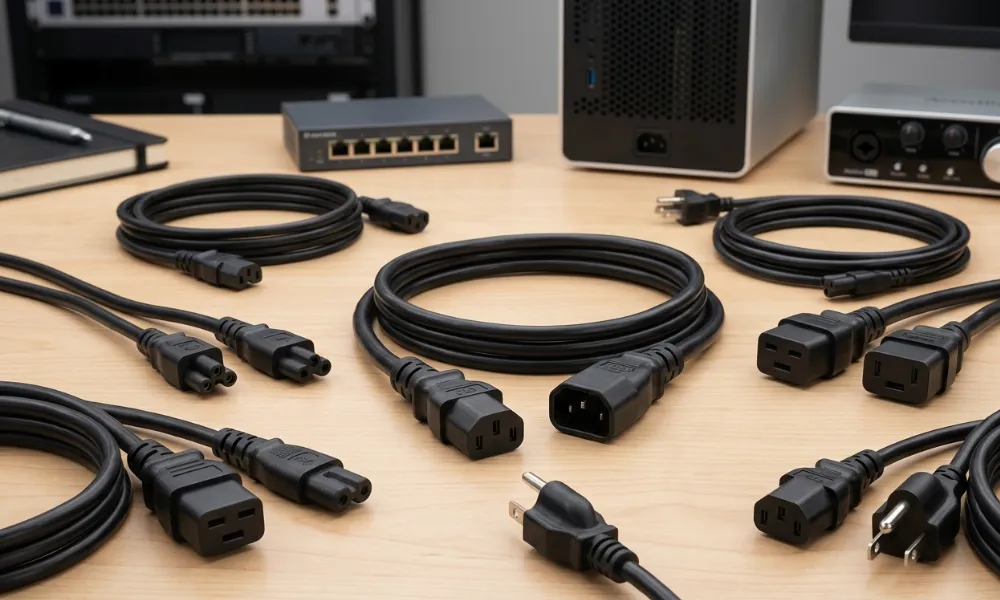
The first and most important step is identifying the correct connector type for your device. IEC connectors are categorized with codes like C13, C14, C15, and IEC320-C19.
Here’s a quick breakdown:
-
C13 – Most common, used for computers, monitors, and printers
-
C15 – Similar to C13 but designed for higher temperature equipment
-
IEC320-C19 – Used for high-power devices like servers and enterprise hardware
-
C14 / C20 – These are inlet connectors (what the device has)
For example, if your server has a C20 inlet, you’ll need a cord with an IEC320-C19 connector.
Tip: Always check the port on your device before buying an IEC 320 power cord. It’s the easiest way to avoid compatibility issues.
Step 2: Check Voltage and Amperage Ratings
Not all IEC 320 power cords are built the same. Each cord has a specific voltage and amperage rating, which determines how much power it can safely handle.
-
Standard devices: 10A–15A (C13 cords)
-
High-power equipment: 16A–20A (IEC320-C19 cords)
Using a cord with a lower rating than required can cause overheating and potential damage. On the other hand, using a higher-rated IEC 320 power cord is generally safe and often recommended for demanding setups.
Step 3: Consider Your Equipment Type
Different equipment requires different types of IEC 320 cables. Here’s how to match them:
For home or office use:
A standard C13 IEC 320 power cord is usually enough for desktops, monitors, and small electronics.
For networking equipment:
Switches and routers may require either C13 or C15 cords, depending on their heat output.
For data centers and servers:
High-performance systems typically use IEC320-C19 cables because they can handle higher loads and provide more stable power delivery.
Choosing the right cord based on your equipment ensures better performance and longer lifespan.
Step 4: Choose the Right Cable Length
Cable length might seem like a minor detail, but it can make a big difference in setup and efficiency.
-
Short cords (1–3 ft): Ideal for server racks and compact setups
-
Medium cords (6 ft): Common for office use
-
Long cords (10+ ft): Useful when outlets are far away
Using the correct length of IEC 320 power cord helps reduce cable clutter and improves airflow, especially in data centers where cooling is critical.
Step 5: Look at Build Quality
Not all IEC 320 power cords are created equal. A high-quality cable will last longer and perform better under continuous use.
Key features to look for:
-
Durable insulation (like SJT or H05VV-F)
-
Strong connectors that don’t loosen easily
-
Heat resistance for high-load environments
-
Proper shielding to reduce interference
A well-built IEC 320 cable is especially important for mission-critical systems where downtime is not an option.
Step 6: Understand Special Use Cases
Some equipment requires more than just a standard IEC 320 power cord.
High-temperature environments:
Devices like servers or industrial machines may need C15 connectors, which can handle higher heat than standard C13.
High-power setups:
For enterprise systems, IEC320-C19 cords are the go-to choice due to their higher capacity.
International compatibility:
IEC cords often come with different plug types on the wall side (NEMA, UK, EU, etc.), making them versatile for global use.
Understanding your specific use case ensures you pick the most suitable IEC 320 power cord.
Step 7: Safety and Certifications Matter
When dealing with electrical equipment, safety should always come first. Make sure your IEC 320 power cord meets recognized safety standards such as:
-
UL (Underwriters Laboratories)
-
CSA (Canadian Standards Association)
-
RoHS compliance
Certified IEC 320 cables are tested for performance and safety, giving you peace of mind—especially in professional environments.
Common Mistakes to Avoid
Even experienced users sometimes make mistakes when choosing IEC 320 power cords. Here are a few to watch out for:
-
Ignoring connector type – Always match C13, C15, or IEC320-C19 correctly
-
Using underrated cables – Can lead to overheating
-
Choosing poor quality cords – Increases risk of failure
-
Overlooking length requirements – Causes messy or inefficient setups
Avoiding these mistakes can save you time, money, and potential headaches.
Why the Right Choice Matters
Choosing the correct IEC 320 power cord isn’t just about plugging in your device—it directly impacts performance, safety, and reliability.
A properly selected IEC 320 cable ensures:
-
Stable power delivery
-
Reduced risk of downtime
-
Longer equipment lifespan
-
Better energy efficiency
In environments like data centers, where every second of uptime matters, the right IEC320-C19 or C13 cord can make a significant difference.
Final Thoughts
At first glance, all power cords may look similar—but when it comes to performance and safety, the details matter. Taking a few minutes to understand your requirements can help you choose the perfect IEC 320 power cord for your equipment.
From identifying the correct connector type to checking power ratings and build quality, each step plays a role in ensuring your setup runs smoothly. Whether you’re powering a single desktop or an entire server rack, the right IEC 320 cable is a small investment that delivers big reliability.
So next time you’re setting up equipment, don’t overlook the basics—because the right IEC320-C19 or C13 power cord could be the difference between seamless performance and unexpected issues.
0 Comments:
Leave a Reply